
Palm Beach Post: Local News
USA TODAY Co.News & Magazines
2.7105.00 Reviews
- Version
- 8.10.3
- Installs
- 10.00K
- Age Rating
- Everyone
Screenshots

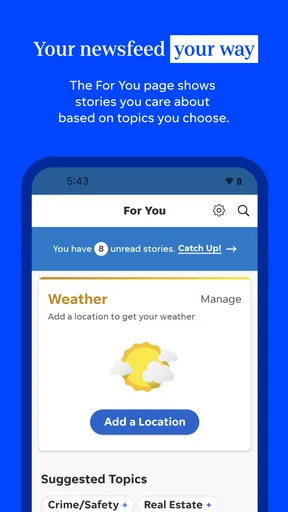
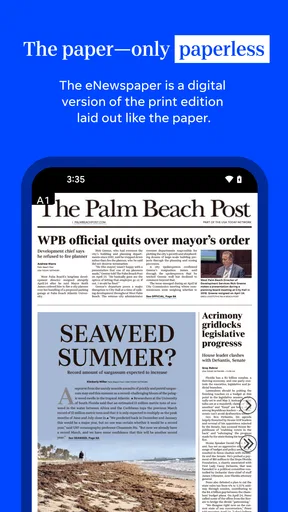


Our Review of Palm Beach Post: Local News
 Analysis by Appyee
I approached Palm Beach Post: Local News as a focused news app rather than a complete replacement for every source on my phone. Its store page describes coverage connected with North Jersey high school sports, while the short description names Palm Beach Post, so the app’s positioning feels unusually narrow and slightly confusing. That matters before installation: this is best treated as a publication-specific reader, not a broad national news service.
Published by USA TODAY Co., the free News & Magazines app is aimed at readers who want local reporting in a mobile format. I would especially consider it for someone who follows community stories, school sports, schedules, and scores closely enough to check them during the day. I would not choose it as my only news source, because its appeal depends heavily on whether its local coverage matches the place and subjects I care about.
How the app feels in its current state
The most useful way to understand this app is as a quick access point to local information. A reader may open it before work to check what happened overnight, glance at sports results after school, or look for a developing community story without sorting through a national feed. That narrow purpose can be a strength: local coverage is often more valuable when it is easy to reach and separated from the noise of larger headlines.
At the same time, the wording around the app creates an important practical question. North Jersey high school sports and Palm Beach Post local news point toward different audiences. I would therefore inspect the available sections immediately after installing it instead of assuming the title tells the whole story. If the content shown matches my location and interests, the app could become a handy daily shortcut. If it does not, the mismatch would be a reason to remove it rather than spend time trying to make it fit.
The app is free to install, with in-app purchases listed from $19.99 to $69.99 per item. That makes the initial trial fairly low-risk, but I would still pay attention to any subscription or purchase screen before continuing. A free download does not necessarily mean that every article or service is included without a payment prompt, so I prefer to understand the access model before relying on it for regular reading.
The age rating is Everyone, which suits a general household news reader. Parents may still want to remember that local journalism can cover accidents, crime, politics, or other serious subjects even when an app carries an all-ages rating. The rating describes suitability in broad terms; it does not turn news into children’s entertainment.
A practical morning and game-night routine
My preferred routine with a local publication app is deliberately simple. I would open it in the morning, scan the main local items, and save the most relevant story mentally rather than trying to read everything. Later, if I were following a high school team, I would return around the end of a game to check the score or schedule. This two-check pattern is more realistic than leaving a news app open constantly, and it keeps the app useful without making it a distraction.
For a parent, student, coach, or relative following school athletics, the sports angle could be the real reason to keep it installed. A schedule is useful before traveling to a game, while a score is useful afterward when a group chat has incomplete information. The trade-off is that a specialist sports source may offer deeper team tools, live updates, or broader statistics. I would use this app for convenient local awareness, not automatically assume it replaces a dedicated athletics service.
Another sensible workflow is to use the app alongside a browser. I might discover a local headline inside the app, then open the publication’s broader web presence when I need background, older coverage, or easier reading on a larger screen. That approach reduces frustration if the mobile layout is better for scanning than for long sessions. It also avoids forcing one app to handle discovery, research, and archiving equally well.
What the version history tells existing users
The current version is 8.10.3, and the app has been available since March 20, 2013. That long presence suggests an established product rather than a brand-new experiment, but age alone does not prove that every part of the experience feels modern. I would judge the current build by how quickly it reaches local stories, how clearly it separates sections, and how smoothly it handles the transition from headline to full article.
For someone upgrading from an older installation, the version number is a useful checkpoint. I would update before deciding that a past annoyance still exists, then spend a few minutes checking the areas I use most: local headlines, sports schedules, scores, article reading, and account or purchase screens. This is a better test than relying on memories of an earlier build, especially for a publication app that may change its layout or access flow over time.
The available product facts establish the current version, but they do not provide a detailed change log. I therefore would not claim that a particular redesign, notification system, or performance fix arrived in this release. The responsible conclusion is narrower: the app is actively represented by a current build, while the exact evolution needs to be judged from the installed experience rather than guessed from the version number.
That distinction matters for existing users. A familiar interface can make an update feel successful even when the underlying content is unchanged, while a small navigation change can disrupt a daily reading habit. I recommend checking whether your preferred section is still easy to reach and whether any payment or sign-in step appears at a different point. Those are the changes a regular reader notices first.
Where it helps, and where alternatives win
Compared with a general news aggregator, this app should appeal to readers who value a publication’s local focus over a large mixture of sources. Aggregators are convenient for scanning national and international headlines, but they can bury a school result or neighborhood story beneath subjects that do not affect your day. A publication-specific app offers a more intentional starting point.
Compared with reading the same publication in a mobile browser, the app may feel more direct for repeated visits. An installed icon removes a search step, and a dedicated interface can make habitual checking easier. The browser remains the better option when I want to compare several publications, avoid adding another app, or read on a device where storage and notifications are concerns.
Compared with a dedicated sports scoreboard, this app’s likely advantage is context. A score becomes more meaningful when it sits near local reporting and community coverage. The specialist scoreboard wins when I need rapid game-by-game tracking, extensive statistics, or a wide range of teams. I would choose between them based on whether I want journalism around the result or the result itself.
The publication focus also creates a trade-off in trust and convenience. A single newsroom can provide a coherent local perspective, but no one outlet covers every angle. I would cross-check major claims with another reputable source, especially for breaking events or information that could affect travel, safety, or school plans. That is not a criticism unique to this app; it is simply good practice with local news.
Small details that affect everyday usefulness
One non-obvious test I would perform is checking how the app behaves when my attention is limited. Local readers often use news apps with one hand while commuting, waiting outside a school, or standing in a grocery line. If headlines are easy to scan and articles open without unnecessary detours, the app earns a place in that routine. If every visit requires several taps before reaching the relevant section, the browser may be less irritating.
I would also separate “latest” from “most useful.” A newly posted item is not always the story I need. For school sports, the schedule may matter more before an event, while the final score matters afterward. For local news, a developing report may need a later return visit before it becomes genuinely informative. The app is more valuable when I use each section according to the moment instead of judging it only by the first screen.
A second practical tip is to be careful with purchase decisions made during a quick check. Because paid items are listed in the app, I would never tap through a prompt automatically while trying to reach a story. I would read the wording, identify whether the charge is one-time or recurring, and confirm that the content is relevant to my local needs. This is especially important for families sharing a device or payment method.
A third trade-off concerns location. The combination of North Jersey sports wording and Palm Beach Post branding means I would verify the geographic relevance before building a habit around it. A reader in the right coverage area may find the app highly practical; someone elsewhere may see mostly limited value. This is the kind of issue a generic description cannot resolve, and it is more important than the app’s broad News & Magazines label.
Finally, I would use the app as a starting point for conversations, not as a replacement for direct confirmation. If a schedule affects a family trip, I would check the latest official notice as well. If a score matters for a team or school, I would confirm it when timing is critical. The app can make discovery faster, but responsibility still belongs with the reader when plans depend on changing information.
Who should install it and who should skip it
I can recommend trying Palm Beach Post: Local News to readers who have a clear connection to the publication’s local audience or to the high school sports coverage described in its listing. It is also worth considering for people who prefer a publication’s own app to a crowded feed of unrelated headlines. The free entry point makes a short trial reasonable, provided the content shown after installation is the content you expected.
I would skip it if I mainly want world news, technology reporting, weather tools, or a single dashboard combining many regions. A broad aggregator, a trusted browser reading list, or a dedicated weather and sports combination would probably serve that purpose better. I would also avoid making it my first choice if I need advanced score tracking or if the geographic focus does not match where I live.
The average rating is 2.7 from around 187 ratings, with roughly 105 written reviews. I treat that as a caution signal rather than a final verdict. A rating can reflect older versions, access expectations, regional mismatches, or frustrations that do not affect every reader. Still, it encourages me to test the app’s core path carefully before committing to any purchase or moving my daily news routine entirely into it.
Its install base is over 10 thousand, which places it in a smaller, more specialized space than the biggest general news apps. That is not automatically negative. A local publication does not need mass-market scale to be useful to the people it serves. It does mean that I would evaluate it by relevance and reliability for my community, not by popularity alone.
What I would watch next
My main expectation for future updates would be clearer positioning. The app should make it immediately obvious whether I am entering Palm Beach Post local coverage, North Jersey high school sports coverage, or a combination of related content. Clear labeling would reduce the biggest first-use friction and help readers decide quickly whether the app belongs on their phone.
I would also watch how the current build handles the balance between free reading and paid access. The listed purchase range is significant enough that transparency matters. A good experience should make the value of any paid option understandable before a reader reaches a confirmation screen, especially when the app is presented as free to install.
For regular users, the most meaningful improvements would be practical rather than flashy: dependable access to the sections they follow, straightforward movement between schedules and scores, and a reading flow that does not interrupt a quick local check. I would rather see those basics refined than a crowded interface filled with features I rarely use.
My final view is cautiously positive, with a strong condition attached: local relevance decides whether this app is useful. The long-running product, current version 8.10.3, free installation, and focused news purpose make it worth testing for the right audience. But the modest user rating, purchase range, and mixed geographic wording mean I would verify the content and access model before relying on it. For a reader who wants a convenient local-news and school-sports touchpoint, it may fit neatly into a daily routine. For everyone else, a browser or broader news alternative is likely the more sensible choice.
Verdict
Strengths of Palm Beach Post: Local News
- Fast access to breaking news across Palm Beach County
- Offers local reporting focused on communities and public affairs
- Includes sports coverage for regional teams and events
- Allows readers to save articles for later viewing
- Supports customizable alerts for important local updates
Limitations of Palm Beach Post: Local News
- Some articles may require a digital subscription to read fully
- Advertising can make the reading experience feel cluttered
- Push notifications may become frequent without careful settings
- Coverage is mainly regional and less useful outside South Florida
- App performance may vary on older phones or slower connections
Other Releases by USA TODAY Co.
View All
IndyStar: Indianapolis Star
News & Magazines2.7

AZ Central: Arizona Republic
News & Magazines2.5

The Detroit News: Local News
News & Magazines3.1

Detroit Free Press: Freep
News & Magazines3.0
Similar Picks in This Category
View All
Google News - Daily Headlines
Google LLC4.0

X
X Corp.4.8

Flipboard:Your Social Magazine
Flipboard3.4

Opera News: breaking & local
Opera4.5

Hindi News by Dainik Bhaskar
Dainik Bhaskar Group4.0

Way2News Daily News App
Way2News ( Formerly Way2SMS )4.6
Frequently Asked Questions
What is Palm Beach Post: Local News?
Palm Beach Post: Local News is a mobile news app focused on current events and community coverage in Palm Beach County and surrounding South Florida areas. It brings together local reporting, breaking news, politics, crime, weather, sports, business, entertainment, and lifestyle stories in one place. The app is designed for readers who want convenient access to regional journalism while using an Android or iOS device.
Is Palm Beach Post: Local News free to download and use?
The application is generally free to download, and users may be able to read selected articles without paying. However, access to the complete article library, premium journalism, archives, or certain digital features may require a Palm Beach Post subscription or an account. Availability and pricing can change, so it is important to review the subscription details shown in the app store listing or inside the application before confirming a purchase.
What type of news and content can I read in the app?
The app typically covers a broad range of Palm Beach County news, including local government, public safety, education, traffic, weather, real estate, business, health, and community events. Sports coverage and stories about local teams may also be included, along with entertainment, opinion, and lifestyle articles. Content is primarily regional, making it more useful for readers connected to South Florida than for those seeking national news only.
Does the app send breaking-news notifications?
Palm Beach Post: Local News may offer push notifications for breaking stories, severe weather, major traffic developments, sports updates, and other important regional events. During setup, users can usually decide whether to allow notifications and may be able to adjust notification categories later through the app or device settings. Notifications can be helpful for staying informed, although readers who prefer a quieter experience can disable them at any time.
Do I need an account or subscription to access all features?
Some basic content may be available without signing in, but an account can be required for personalized features, saved articles, newsletters, subscription management, or access across multiple devices. A paid subscription may also be necessary to read articles beyond any free limit. Before downloading or subscribing, check the current terms, renewal conditions, and in-app pricing, since access rules and available plans can vary by location and platform.
